
Download UnxUtils – Unix commands, command line, Windows, learn Unix, terminal tools, utility, free tool, command line utilities, Unix-like, learning tool
Overview
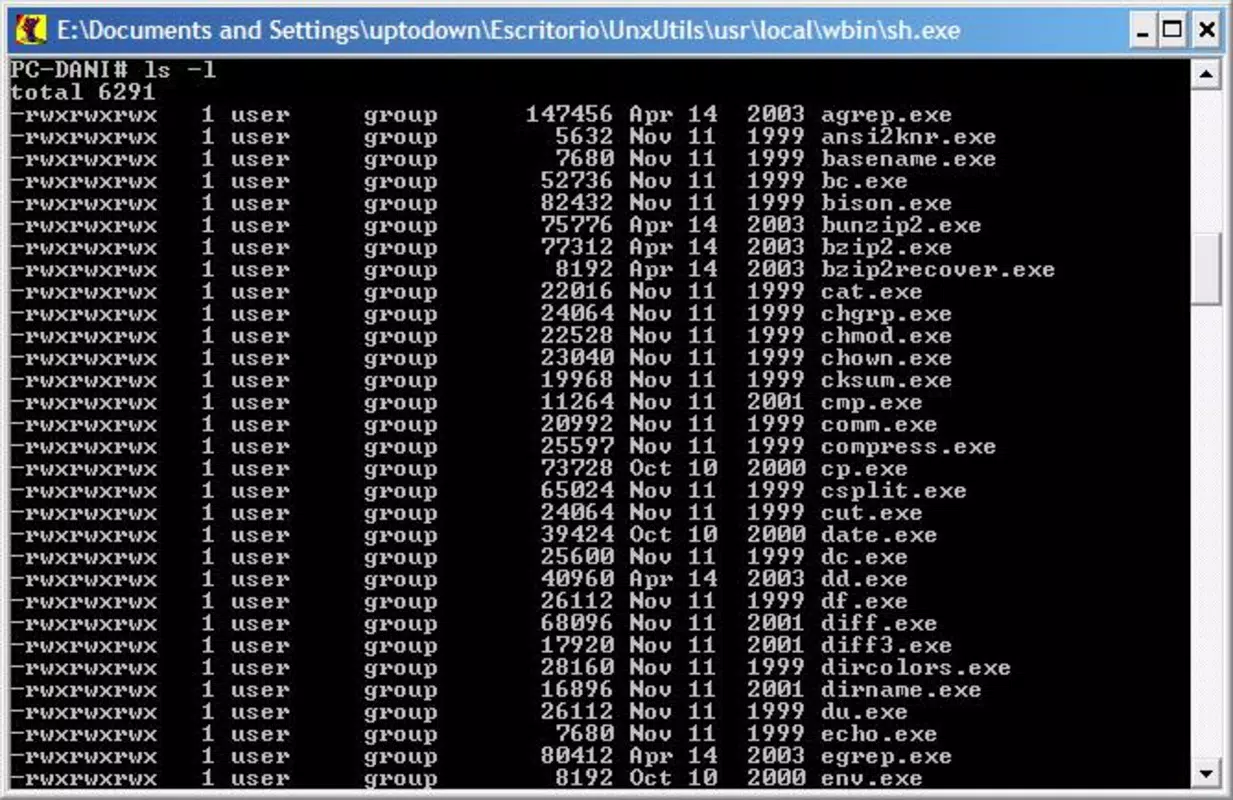
UnxUtils is a lightweight utility designed to bring essential Unix command-line tools to the Windows operating system. It serves as a bridge for users seeking to explore or master Unix-like environments without switching platforms. The application provides access to a curated set of fundamental commands such as ls, grep, and find, enabling users to practice core functionalities used in Unix and Linux systems. This makes it particularly valuable for students, developers, and IT professionals who need to develop or maintain cross-platform command-line skills.
By offering a familiar interface for Unix commands within a Windows context, UnxUtils reduces the friction associated with learning new environments. It supports academic use, personal experimentation, and professional training, especially in scenarios where access to Unix or Linux systems is limited. The tool is especially beneficial for those preparing for certification exams, working on cross-platform projects, or transitioning from Windows to Unix-based workflows.
Developed by the UnxUtils team, the application has been available since 2008, reflecting a long-standing commitment to accessibility in command-line education. Although the developer did not provide additional technical details about the project’s evolution or future roadmap, its enduring presence indicates reliability and sustained utility. The app plays a meaningful role in the broader productivity ecosystem by empowering users to expand their technical capabilities with minimal setup and no cost.
Key Features & Functionality
- Unix Command Compatibility: UnxUtils enables Windows users to run a selection of standard Unix commands directly from the command line, promoting interoperability between operating systems.
- Essential Command Set: The suite includes foundational tools like
ls(list files),grep(search text),find(locate files), andcd(change directory), which are widely used in Unix environments. - User-Friendly Interface: Designed with simplicity in mind, the application provides straightforward access to command-line tools, minimizing the learning curve for beginners.
- Effective Learning Tool: Ideal for academic and self-directed learning, UnxUtils allows users to experiment with Unix commands in a safe, accessible environment.
- No Installation Hassle: The tool runs without requiring a traditional installation process, allowing users to deploy it quickly and start using Unix commands immediately.
For example, a student studying computer science can use grep to search through log files or script outputs, while a developer can practice file navigation with ls and cd before deploying code to a Linux server. The lack of dependency on a full Unix environment makes it a practical choice for users who need on-the-go access to Unix-like functionality.
Interface, UX & Performance
UnxUtils presents a minimalistic command-line interface, consistent with the traditional Unix terminal style. The layout is clean and focused, prioritizing functionality over visual flair. Navigation is straightforward, relying on standard keyboard input and command syntax, which aligns with Unix conventions. This design ensures that users can concentrate on learning command behavior rather than adapting to complex UI elements.
Although the developer did not list formal performance metrics, the application’s small file size of 12.5 MB suggests efficient resource usage. It is likely to operate smoothly on a wide range of Windows systems, including older or low-spec devices. Responsiveness is expected to be prompt, given the nature of command-line operations and the absence of graphical overhead.
Stability appears to be a key strength, considering the app’s long-standing presence since 2008. Users can expect consistent behavior across sessions, with minimal risk of crashes or unexpected errors. However, specific requirements for system compatibility were not disclosed, so users should ensure their Windows environment supports basic command-line execution.
Platform Compatibility & Technical Requirements
UnxUtils is designed exclusively for the Windows platform. It runs on Windows operating systems, though the developer did not specify minimum OS versions or exact compatibility details. The application is distributed as a portable package with a file size of 12.5 MB, indicating it is lightweight and suitable for systems with limited storage.
Since no installation process is required, users can run the tool directly from a USB drive or local folder. This makes it highly flexible for use in shared or restricted environments. The lack of formal system requirements means users should rely on general Windows compatibility guidelines when deploying the app.
While the developer did not list specific hardware or software prerequisites, the application’s size and nature suggest it will function on most modern Windows devices. Users seeking to run it on older systems should verify that their environment supports standard command-line execution.
Pros and Cons
Pros
- Free to download and use, making it accessible to all users.
- Provides essential Unix command-line tools on Windows without installation.
- Small file size ensures minimal storage impact.
- Supports learning and practicing Unix commands in a familiar Windows environment.
- Long-standing availability indicates reliability and stability.
Cons
- No official updates or support information provided since 2008.
- Compatibility with modern Windows versions was not confirmed.
- Limited to a basic set of Unix commands; not a full Unix environment.
- No graphical interface or built-in tutorials for beginners.
- Developer did not disclose future development plans.
FAQ
Is UnxUtils safe to download and use?
Yes, UnxUtils is a free tool distributed through trusted open-source channels. As a long-standing utility, it has been used by developers and students without reported security issues.
Can I use UnxUtils on Windows 10 or Windows 11?
While the developer did not specify compatibility with modern Windows versions, the application’s lightweight design suggests it should function on Windows 10 and Windows 11 systems.
Do I need to install UnxUtils?
No, UnxUtils is designed to run without installation. You can extract the files and execute the commands directly from any folder.
Is UnxUtils regularly updated?
The last known release was in 2008. The developer has not provided information on future updates or maintenance.
Can I use UnxUtils for professional work?
It is suitable for learning and basic command-line tasks. However, for production environments, users may prefer full Unix-like systems such as WSL or Cygwin.
Final Thoughts
UnxUtils remains a valuable resource for anyone looking to explore Unix command-line tools on Windows. Its simplicity, portability, and zero cost make it an ideal starting point for beginners and a handy reference for experienced users. While it lacks modern updates and a graphical interface, its core functionality continues to serve its purpose effectively.
Students, educators, and developers seeking to build cross-platform skills will benefit most from this tool. It offers a practical, no-frills way to gain familiarity with essential Unix commands without the overhead of a full system migration.
Despite its age, UnxUtils demonstrates how a focused, lightweight utility can maintain relevance over time. For those looking to enhance their command-line proficiency in a secure, free, and accessible way, it remains a solid choice.
Download UnxUtils now


